The browser
Let the agent open, click through and check the app you build: a browser panel on desktop, a headless browser in the terminal. Local addresses only by default.
Copy & share
On this page7 sections
OverviewLink to this section
Empryo can open your running app in a browser, click through it, fill in forms, take screenshots and read what's on the page. Use it to check that a change actually works, reproduce a UI bug, or test a flow without doing it by hand.
The agent drives the browser through one tool, browser, with an action argument (open, click, snapshot and so on). It's available on every surface:
| Surface | Browser | What it can do |
|---|---|---|
| Desktop app | A visible, tabbed browser panel | Everything below, plus audits, network throttling, request recording and a dev-server runner |
| Terminal UI and headless | A headless browser with no window | Open, navigate, snapshot, screenshot, click, type, keys, scroll, resize, inspect, run JavaScript, wait, highlight, manage tabs, clear storage |
The same prompt works on both.
Local addresses only, by defaultLink to this section
The browser opens localhost and private-network addresses only. Public websites are blocked. It's meant for the app you're building, not for browsing the web, and keeping it local limits what a malicious page could make the agent do.
To allow public sites:
- Desktop: Settings → Browser network, or
"browser": { "allowExternalNetwork": true }in config. - Terminal and headless:
"terminalBrowserAllowExternal": truein config.
Snapshots before screenshotsLink to this section
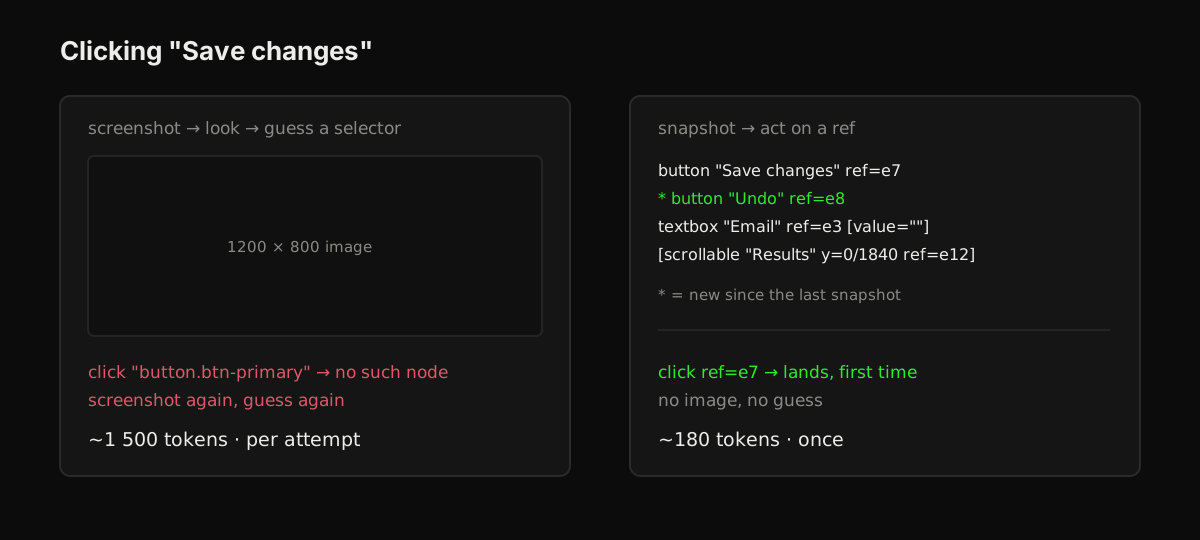
browser(action:'snapshot') returns every visible interactive element as a short text list, each with a stable ref:
  button "Save changes" ref=e7
* textbox "Email" ref=e3 [value=""]
  [scrollable "Results" y=0/1840 ref=e12]
The agent then acts on the ref, for example browser(action:'click', ref:'e7'), instead of guessing a CSS selector from your source code.
A * marks elements that are new since the last snapshot. That's how the agent checks what a click did without paying for a screenshot, which costs far more tokens than a text list.
Desktop-only actionsLink to this section
The desktop browser panel adds developer-tools features:
audit: Core Web Vitals, page weight, accessibility and SEO checks, and horizontal-overflow detection.throttle: slow network (slow 3G, 4G, offline) and CPU slowdown.network_start/network_stop: record every request with its status, size, timing and failures.run_server/stop_server/list_servers: start your dev servers from.empryo/launch.jsonand open them in a tab.
You share the panel with the agent and can watch or take over at any time. When several agents work at once, each tab is held by one agent at a time so two agents never type into the same page (see tabs).
The terminal browserLink to this section
In the terminal UI and in --headless runs, the browser has no window. It uses the system web view on macOS and Windows, and Chrome or Chromium on Linux.
On Linux, install Chrome or Chromium, or set BUN_CHROME_PATH to its path. Without one, the browser tool isn't offered.
Screenshots are sent to the model as images, so it can still see the page.
To turn the terminal browser off, set "terminalBrowser": false in config.
ConfigLink to this section
| Key | Default | Effect |
|---|---|---|
terminalBrowser | on where supported | The browser tool in the terminal UI and headless runs |
terminalBrowserAllowExternal | false | Allow public websites in the terminal browser |
browser.allowExternalNetwork | false | Allow public websites in the desktop browser panel |
Browser vs. computer useLink to this section
This tool drives pages in Empryo's own browser. Computer use goes further: it can drive your own Chrome, other app windows or the whole screen, with separate permissions for each.