Desktop app
The Empryo desktop app: tabs, a visual map of your codebase, a file preview with code intelligence, visual diffs, terminals, and a browser the agent can drive.
Copy & share
On this page14 sections
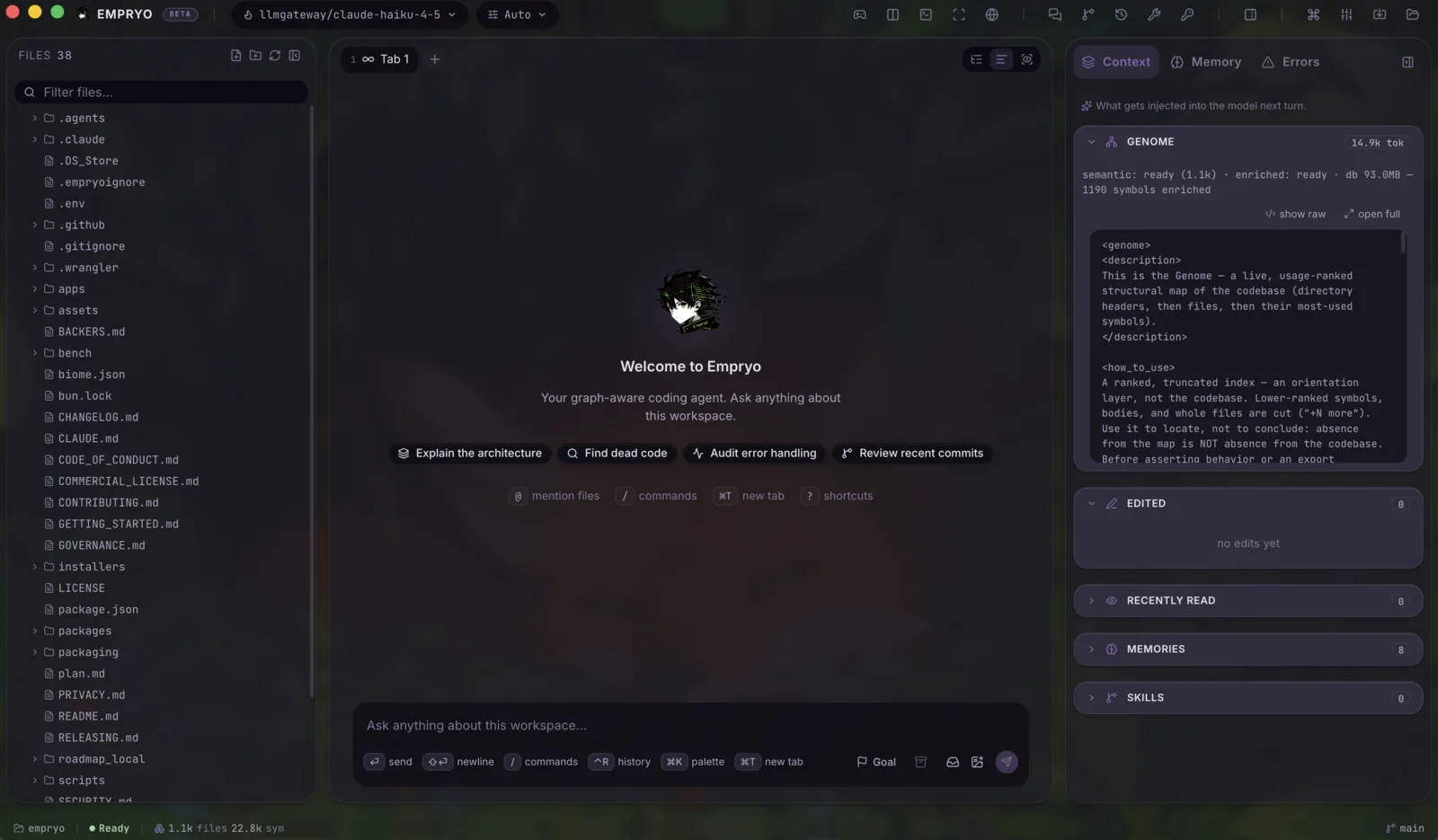
The desktop app gives you the same agent as the terminal UI, in a window. You can see your codebase as a map, preview and edit files with real code intelligence, review diffs visually, run terminals, and watch the agent use a browser. It runs on macOS, Windows and Linux (.AppImage, .deb, .rpm and .pkg.tar.zst). Get it from the download page.
The desktop app and the CLI share the same settings by default, so your keys, theme and configuration carry over.
On a wide window, answers stay in a centered column about 820 pixels wide, lined up with the prompt box, so long paragraphs stay easy to read. Tool calls start at the same left edge and may run wider, up to 1040 pixels. In a narrow pane, both fill the pane.
TabsLink to this section
Each tab is its own conversation on the same project. Tabs share the Genome (Empryo's live map of your code) and memory, and they coordinate file edits so they don't overwrite each other. Every edit is labelled with the tab that made it.
Each tab shows a running indicator, its model, how many files it has edited and what it has cost so far. Double-click a tab to rename it and drag to reorder. The name is saved with the session, so it survives a reload and appears in the terminal UI.
WorktreesLink to this section
The line at the top of the composer shows where the tab works: the local repository, or a git worktree in its own colour, which the tab's label shares. Pick another place there to move the tab. The same tab moves, with its conversation and its draft, and your uncommitted changes are copied along; files another tab is working on stay where they are, and so do files the destination already has its own uncommitted changes to (a notice lists them, and the agent is told). A message you send while the tab moves waits and runs in the new place. A tab with background agents still running moves once they have reported. The next message runs in the worktree with its own engine and its own Genome, and the line shows the Genome's progress while it maps.
New worktree… creates a branch and a checkout, shows git's progress on the same line, and moves the tab there. The Git panel lists the local repository and every worktree with the tabs in it. The diff list and revert follow the tab's checkout. The agent can do the same with the worktree tool, including moving its own tab once its turn ends.
Keyboard shortcutsLink to this section
Cmd on macOS, Ctrl on Windows and Linux.
| Shortcut | Action |
|---|---|
Cmd/Ctrl+K | Command palette |
Cmd/Ctrl+T | New tab |
Cmd/Ctrl+Shift+T | Reopen the last closed tab |
Cmd/Ctrl+W | Close the tab |
Cmd/Ctrl+1…9 | Go to tab 1–9 |
Ctrl+Tab / Ctrl+Shift+Tab | Next / previous tab |
Cmd/Ctrl+L | Focus the prompt box |
⌘⌥E (macOS), Alt+E (Windows, Linux) | Step reasoning effort for this tab (in the prompt box). ⌥E alone still types accents. |
Cmd/Ctrl+F | Search the conversation (or the open file) |
Cmd/Ctrl+Shift+F | Search the whole project |
Cmd/Ctrl+B | Show or hide the sidebar |
Cmd/Ctrl+J | Show or hide the context pane |
Cmd/Ctrl+\ | Split the view. Add Shift to switch between side-by-side and stacked. |
Cmd/Ctrl+Alt+← / → | Move between split panes |
` Ctrl+ `` | Show or hide the terminal |
Cmd/Ctrl+Shift+B | Show or hide the browser |
Cmd/Ctrl+Shift+E | Expand or collapse every tool call |
The Primordial DeepLink to this section
The Primordial Deep is the desktop app's map of your repository. Each file is drawn as a cell. Its position comes from your real import graph, so the layout stays put while you work. As the agent reads and edits files, they light up, and a small marker follows whatever the agent is working on right now.
Hover a file to see what it imports and what imports it. Search to jump to a file. You can open the map full screen or dock it beside the chat.
The map slows itself down when nothing is happening, so it is cheap to leave open. A button on the map chooses which graphics chip draws it: Fast uses the discrete GPU for the smoothest picture, and Eco uses the integrated one to save heat and battery on laptops. The same setting lives in Settings → Window & layout.
PanesLink to this section
- Sidebar: a file tree with a filter. Files the agent edited get a diff button.
- Context pane: what is in the agent's context: code map stats, recently read and edited files, top memories, loaded skills and indexing status.
- Tool calls: a live list of tool calls with timers, and a before/after diff viewer.
- Status bar: code map counts, tokens and cost, files edited, Git branch, and which tab is editing which file.
- File preview: a Monaco editor (the editor from VS Code) with go-to-definition, find-references and hover info from your language servers. Edit and save with
Cmd/Ctrl+S.
The workbenchLink to this section
Settings and tools live in the workbench, a set of pages you reach from the sidebar, the breadcrumb or Cmd/Ctrl+K. It has seven sections: Work, Changes, Genome, My tools, Costs & usage, Settings and Help. API keys, MCP servers, skills, agents, permissions, routines and background jobs all have their own page there.
The workbench describes each section.
BrowserLink to this section
The desktop app includes a Chromium browser that the agent can drive. It can open your app, click, type, scroll, take screenshots at different device sizes, inspect elements, record network traffic and run performance and accessibility audits. You watch it happen in the same window, so you can show the agent a bug and have it fix the bug in one place.
It reads the page before it clicksLink to this section
Instead of guessing a CSS selector from your source code, the agent first takes a snapshot of the page. The snapshot lists every visible interactive element with a short handle:
  button "Save changes" ref=e7
* button "Undo" ref=e8
  textbox "Email" ref=e3 [value=""]
  [scrollable "Results" y=0/1840 ref=e12]
The agent then clicks ref=e7 directly. That is one step instead of a guess, a click and a screenshot to check. It uses far fewer tokens than an image, too.
Snapshots include elements inside shadow DOM and same-origin iframes, and clickable divs and spans. That makes them work on React component libraries and web-component apps, not just plain HTML.
- A
*marks an element that is new since the last snapshot. After a click, a new dropdown shows up as starred options. - Elements hidden behind a modal or toast are left out, and the overlay covering them is named.
You keep your keyboardLink to this section
The agent types into the element it targets, not into whichever window has focus. You can keep typing in the chat while the agent fills in a form. Minimise the browser and the page keeps working. Screenshots are taken from the page itself, so a background tab captures the same as a visible one.
Several agents, several pagesLink to this section
Each chat tab gets its own browser tabs. Any agent can read any page, but only the tab that opened a page can click or type in it. If an agent tries to drive another tab's page, it is refused and told who holds it. Cross-tab coordination has the full rules.
Dev serversLink to this section
List your dev commands in .empryo/launch.json and the agent can start one and open it in a tab. If the file doesn't exist, the agent can create it for you. By default the browser only opens localhost and private-network addresses. Public websites are blocked.
Projects the TUI already has openLink to this section
When the TUI shares a project with /remote, more than one app can use its engine. Open that project in the desktop app and it asks first:
- Join the TUI: the desktop, the TUI and a paired phone show the same chats, live. Quitting the TUI disconnects the desktop window.
- Open on its own: the desktop starts its own engine with its own chats. The TUI keeps working.
Tick Always do this to skip the question next time. Change your answer from the start screen, from the workspace menu at the top of the window, or in the General section of Settings. Recent projects the TUI is sharing carry a TUI tag.
Only in the desktop appLink to this section
- The Primordial Deep, the codebase map described above.
- The browser, with page snapshots, device sizes, network recording and audits.
- The Monaco file preview, with editing and code intelligence.
- Visual diffs in the tool-call pane and the sidebar.
- Embedded terminals: up to five shells, with a shell picker. Toggle with `
Ctrl+``. - Images: attach, paste or drag images in, crop and annotate them, and open them full size. The agent sees them.
- Right-to-left layout: in Arabic the whole interface mirrors, including sliders, menus and arrow-key navigation. Each paragraph of a prompt or reply takes its own direction, so mixed Arabic and English reads naturally, while code, paths and diffs stay left-to-right. See Languages.