The workbench
Find runs, jobs, agent conversations and routines in the terminal workbench. Explore the desktop destinations for code, changes, tools, costs and settings.
Copy & share
On this page8 sections
Terminal workbenchLink to this section
Open /workbench for the engine's activity in one place. Select Runs, Jobs, Link, Advice or Routines from its navigation. Use the on-screen keys to inspect an item; press Esc to return to the conversation.
| Go directly to | Command |
|---|---|
| Multi-agent workflow runs | /runs |
| Background shell jobs | /jobs |
| Messages and rooms between agents | /link |
| Saved second opinions | /advice |
| Scheduled routines | /schedule |
The terminal lessons show these views live, with the keys to press.
Desktop workbenchLink to this section
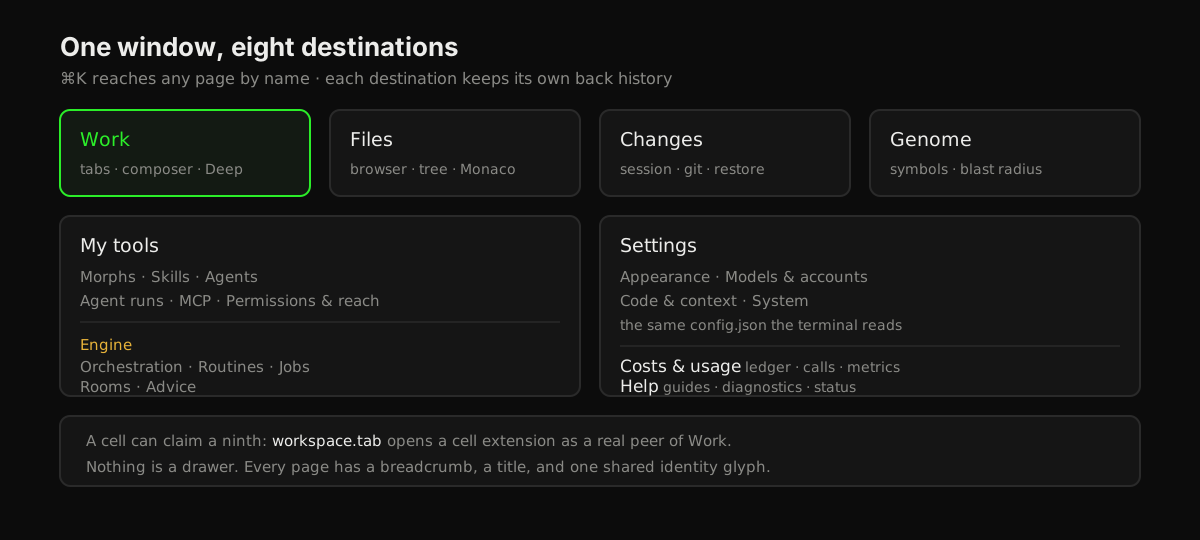
The workbench is how the desktop app is organized. The window has a few main areas, called destinations. Chat is one of them. Keys, MCP servers, skills, routines and the rest each live on a page inside a destination.
Every page has a breadcrumb and a back button. The app remembers where you were, so a reload brings you back to the same page.
To find a page quickly, press Cmd+K (macOS) or Ctrl+K (Windows and Linux) and type its name.
The destinationsLink to this section
| Destination | What you do there |
|---|---|
| Work | Talk to the agent. Tabs, the message box, tool activity, and the Primordial Deep codebase map |
| Changes | Review what the agent changed in this session, work with Git, and restore checkpoints |
| Genome | Explore the Genome, Empryo's map of the files and symbols in your repository |
| My tools | Manage skills, agents, MCP servers, permissions, and running work |
| Costs & usage | See what you spent, every model call, and metrics |
| Settings | Change appearance, models and accounts, code and context options, and system settings |
| Help | Read guides, run diagnostics, check session status, and send feedback |
A Cell can add its own page next to these. Cells are small add-on apps that run inside Empryo. A Cell that declares a workspace.tab extension opens as a full page with the same navigation and back history as the built-in destinations. See Cells & Morphs.
My toolsLink to this section
My tools holds the things you install or configure for the agent: skills, custom agent definitions, MCP connections, and permissions.
It also has an Engine group. These pages show work that keeps running after a turn ends:
| Page | What it shows |
|---|---|
| Agent runs | Every sub-agent and background agent, updated live |
| Orchestration | Multi-step agent runs and their progress |
| Routines | Scheduled runs and their history |
| Background jobs | Shell commands the agent started in the background, with logs and a stop button |
| Rooms | Messages between agents in different tabs |
| Advice | Notes from the advisor for each tab |
SettingsLink to this section
Settings is split into four groups:
| Group | Pages |
|---|---|
| Appearance | Theme, Window & layout, Preferences, Language |
| Models & accounts | Accounts & keys, Subscriptions, Provider options, Proxy |
| Code & context | Behavior, Code intelligence, Context & compaction, Web search, Language servers, Syntax highlighting |
| System | Addons, Storage |
Each setting matches a key in the configuration reference. The desktop app and the terminal read the same config.json, so a change in one applies to the other.
Changes, usage, and helpLink to this section
- Changes has three tabs. _Session changes_ lists what the agent wrote in this session. _Working tree & Git_ lets you stage, unstage, and commit, with a diff preview for each file. _Checkpoints_ lets you roll back to a checkpoint.
- Costs & usage shows your running spend, then _Model calls_ (each request with its latency and why it stopped) and _Metrics_.
- Help has _Guides & support_, _Diagnostics_ (the same checks as
doctor), _Session status_, and _Send feedback_.
Moving aroundLink to this section
Each destination keeps its own history. Back takes you to the previous page inside that destination, not to the last thing you clicked anywhere in the app.
When you switch to another project folder, the old history is cleared. Back never takes you into a project you closed.